This test began with a wonderfully simple idea. We were looking into custom portrait figurines and had the same thought many beginners probably have: AI is good now. Upload a photo, wait a few minutes, send the model to a print shop—done. Once we tried it, we learned that getting a model onto the screen is the easiest part of the journey.
This was one image, one fictional person, and one run on each platform using the settings listed below. Everything here records what we saw on September 4, 2026; software versions, credits, and export rules can change. We inspected one downloaded file, but have not repaired, sliced, or physically printed it. Some screenshots show a Chinese interface; the steps below give the English labels.
CONTROL THE INPUT
We gave ourselves one simple, slightly stubborn rule
One image, three platforms, and no extra hints. To avoid experimenting with a real person's private photo, we created a fictional adult: front-facing, neutral expression, head and shoulders, plain gray background, even lighting. It was not a perfect test image—the profile and back of the head were missing—but every tool received exactly the same starting point.
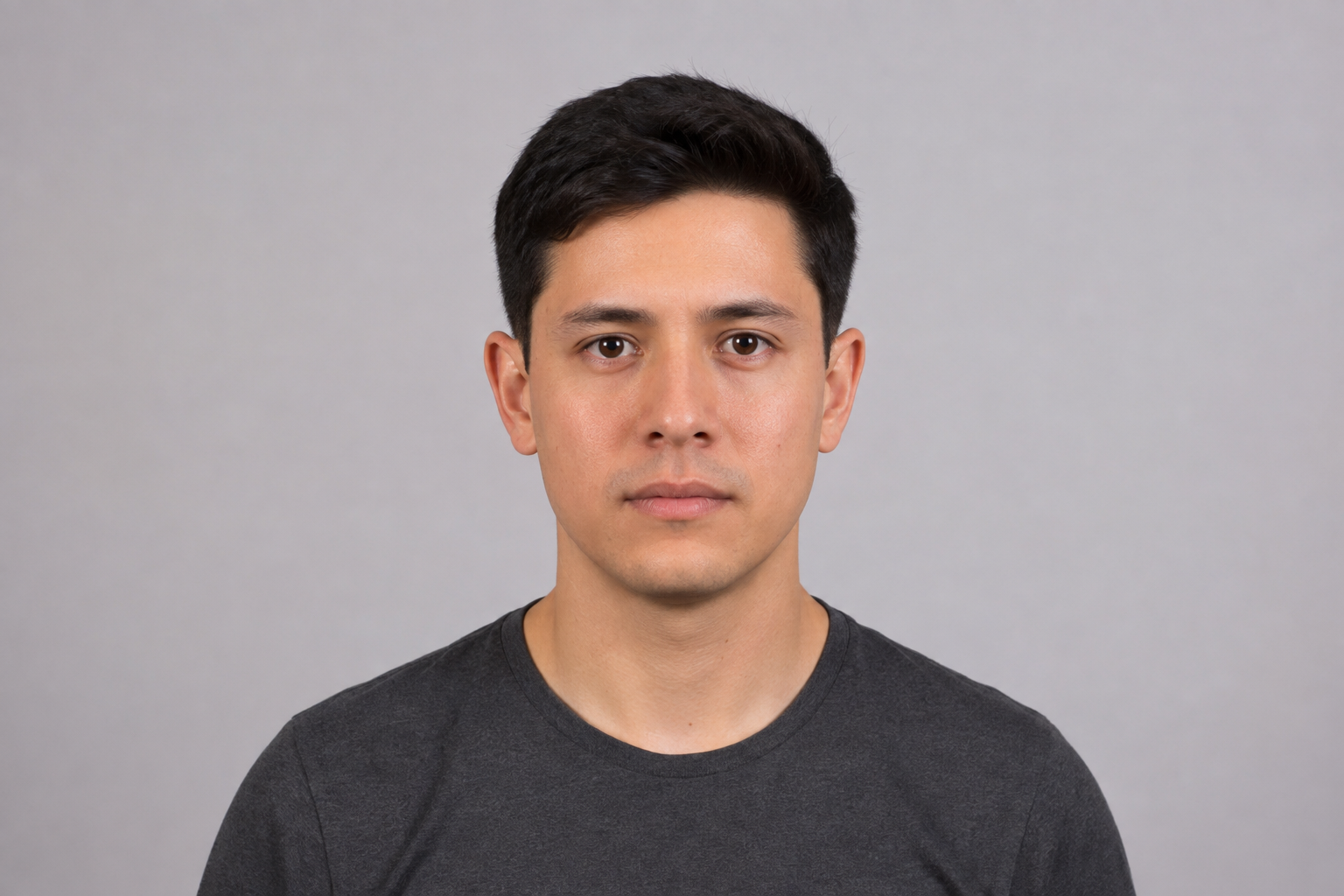
Fictional person, no privacy risk
Testing the platforms, not our prompt tricks
Not just a pretty render
TRIPO / IMAGE TO MODEL
Tripo finished fast—and delivered our first reality check
Tripo was our first stop. Uploading the image was painless, and there was very little in the interface to puzzle over. As the progress moved forward, we felt that small surge of optimism: maybe a printable portrait really would appear a few minutes later.
- 1
We opened Image to Model and uploaded the test portrait.
- 2
We kept Geometry & Texture and selected v3.1 Best Quality.
- 3
We clicked Generate and waited about two minutes for a rotatable bust.
- 4
We clicked Export to see whether we could inspect the file. The free account hit an upgrade wall, so we stopped there.
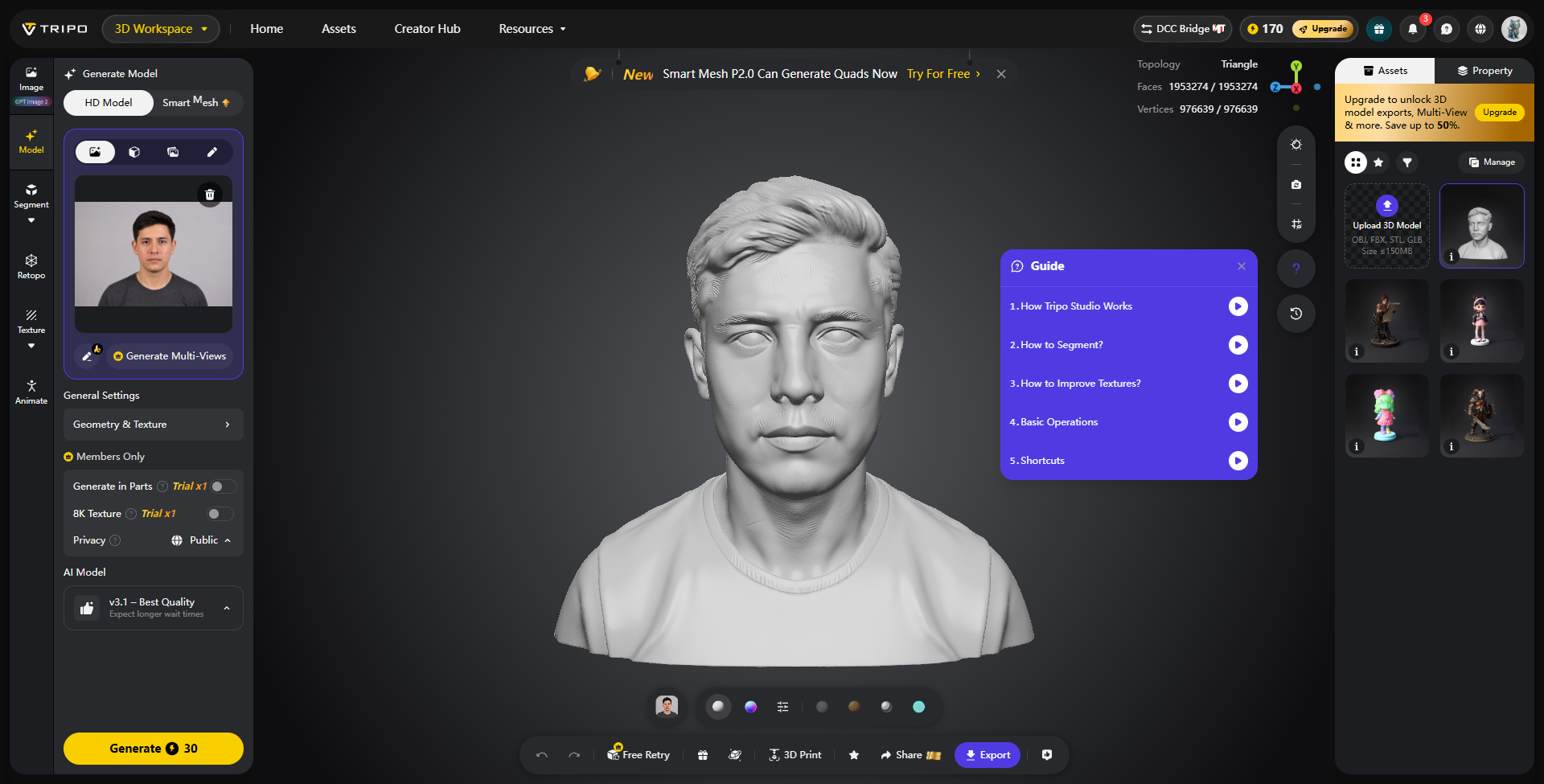
A model did appear quickly: hair, ears, shirt, shoulders—the whole bust was there. For one second, it felt finished. Then we looked back and forth between the model and the photo, and the excitement slowly drained away. The hairstyle had been redesigned, the face had grown longer, and the eyes and lips carried a different personality. Tripo had made a person, just not this person. The export paywall meant we could not even find out whether the mesh underneath was healthy.
MESHY / HIGH DETAIL
Meshy looked more like a finished bust—but still like someone else
Next, we handed the same image to Meshy and deliberately chose High Detail. Tripo had lowered our expectations, but we still wondered whether a model built around detail might pull the face back toward the original.
- 1
We selected Image to 3D and uploaded the exact same front photo.
- 2
We used Meshy 7, High Detail, Standard Resolution, no texture, and Image Enhancement on.
- 3
The interface quoted 20 credits. Generation finished in roughly one minute.
- 4
The result showed a “printable” status, but GLB download opened a subscription prompt. We did not pay.
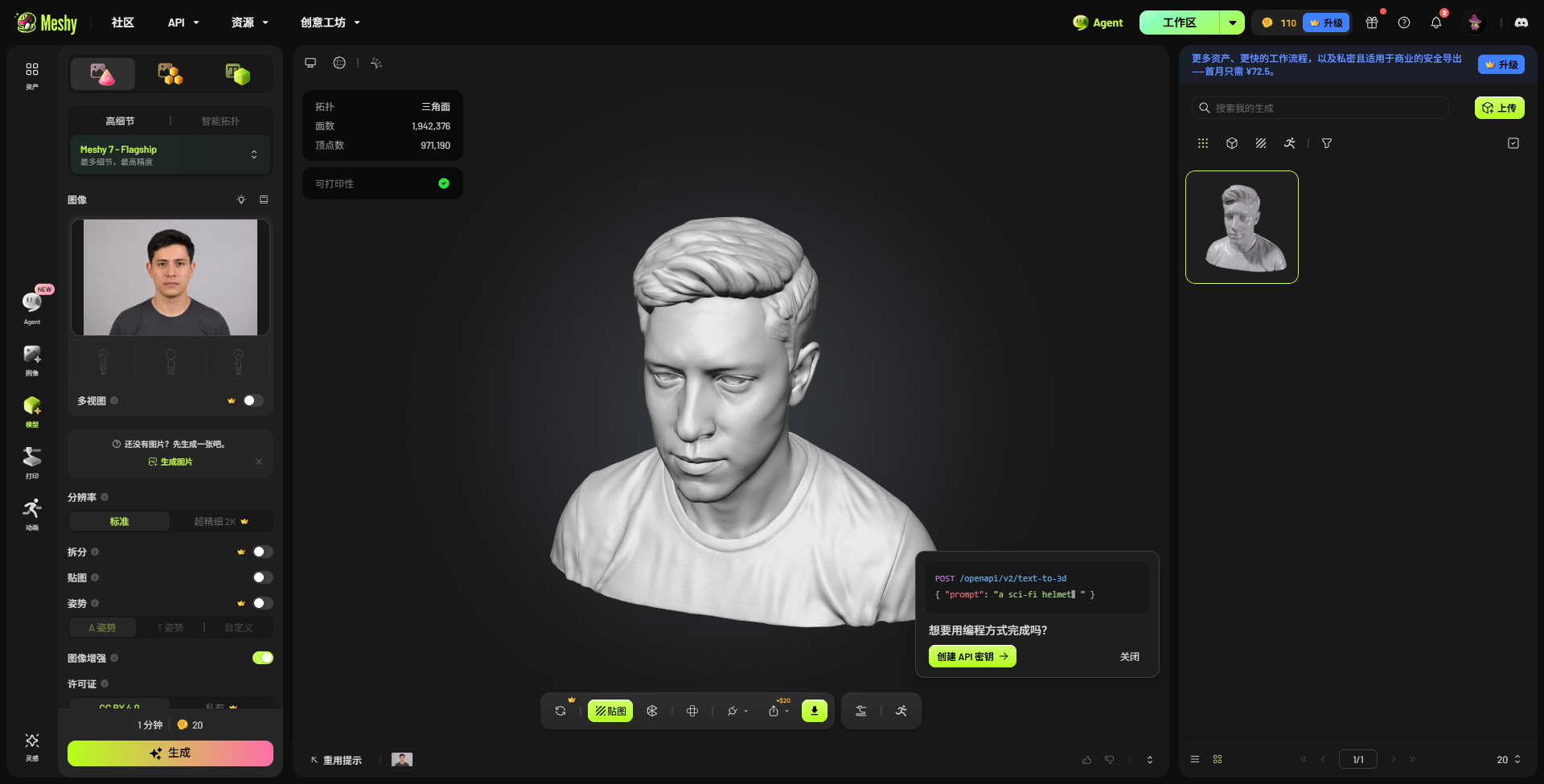
Meshy's shoulders, neckline, and overall silhouette really did look more like a bust you could place on a desk. A green “printable” status appeared too, and it was tempting to relax. Then we looked at the face again. The eyelids, mouth-to-nose relationship, and jaw still belonged to somebody else. The download paywall was frustrating, but useful in one way: it reminded us that “printable” is a platform label. It only becomes our conclusion after we verify the file ourselves.
TENCENT HY3D V3.1
Hunyuan3D was the first time we actually got the model
Hunyuan3D was less frictionless than the first two. We logged in by email, joined a queue, and at one point the page estimated another 190 seconds before our job would even start. We watched the Geometry and Texture bars creep forward. Perhaps because it made us wait, we looked a little harder when the result finally appeared.
- 1
We signed in to Hunyuan3D Global and chose Image-to-3D, then Single Image.
- 2
We uploaded the same portrait and kept 3DGeneration-V3.1, 1.5M faces, and Geometry + Texture.
- 3
The job waited in the queue for about three minutes, then spent roughly two minutes generating geometry and PBR textures.
- 4
We selected GLB and downloaded an 83.5 MB model successfully.
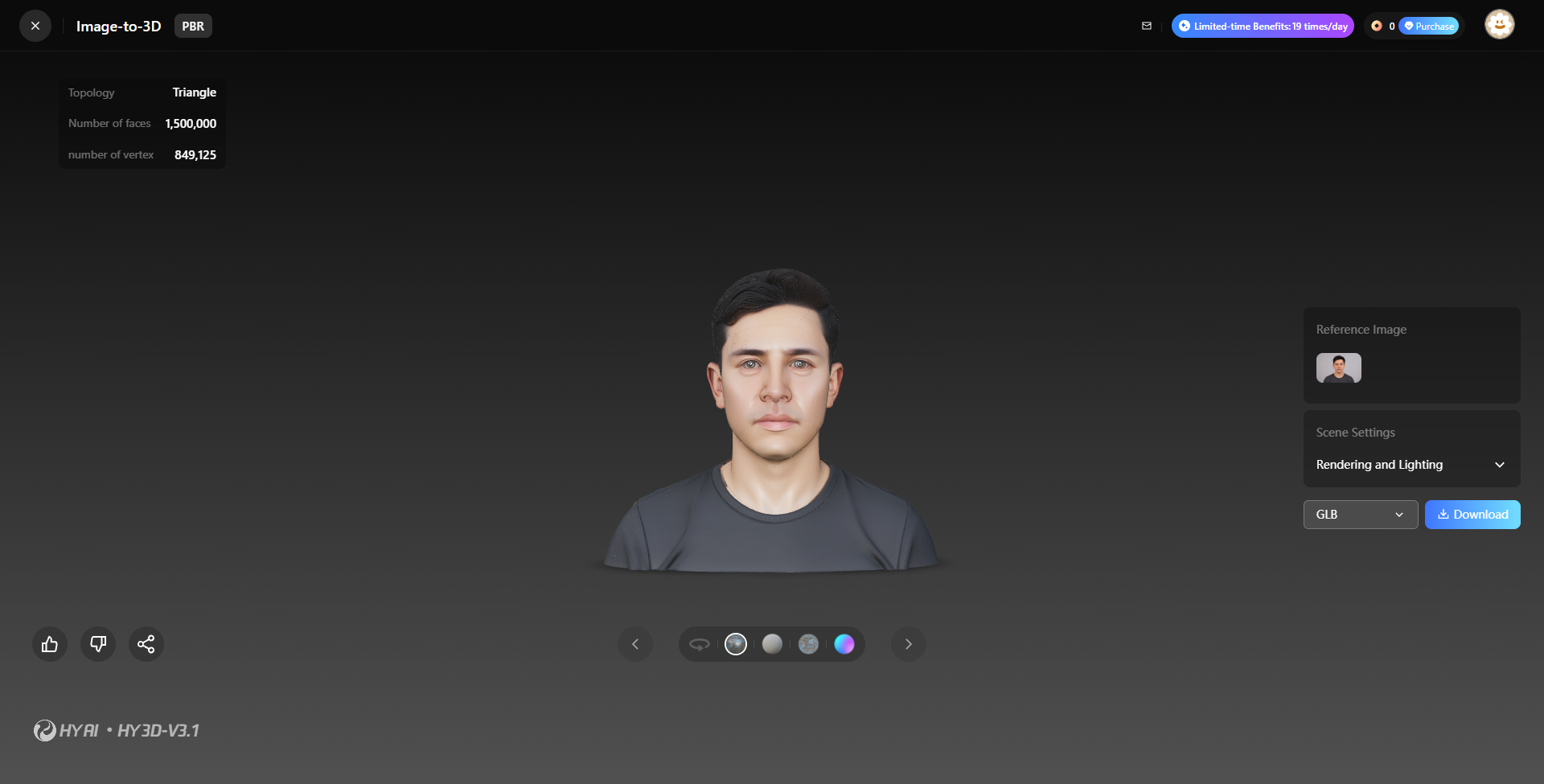
For the first time that afternoon, we found ourselves saying, “This is starting to look like him.” The relationship between the face shape and hairstyle survived better, and even the shirt stayed close to the source. That relief lasted a few seconds. The eyes looked like polished glass beads with no real gaze, the skin was too smooth, and the mouth had lost the tiny asymmetries that make a face feel alive. Still, the Download button was not decorative this time. An 83.5 MB GLB landed on the computer. At last, we could stop judging a screenshot and inspect the thing itself.
INSPECT THE GLB
193,710 open edges? For a moment, we thought the model was hopeless
Hunyuan3D was the only platform that let us take the file home, so it was the only model we could truly examine. We wrote a small script to read the GLB's vertices, triangles, and edge relationships. The first result was alarming: 193,710 one-sided edges. The obvious interpretation was that the model was riddled with holes.
Includes duplicates created at texture seams
Heavy for everyday editing and slicing
Exact-position duplicates grouped for analysis only
Edge counts after accounting for duplicated seam vertices
We resisted the urge to declare the model broken and kept digging. A textured GLB may duplicate a vertex at a UV seam even when both copies occupy the exact same point in 3D space. Counting vertex IDs can mistake those texture seams for holes. When we grouped identical coordinates for the analysis, the open-edge and non-manifold-edge counts both fell to zero. We did not modify or repair the downloaded file. It became our favorite moment in the test: a number can look wonderfully authoritative and still send you in the wrong direction if you do not understand what created it.
Passing that edge check was a relief, but it did not prove the model was ready to print. We had not checked self-intersections, wall thickness, or how a slicer would handle it. About 34,850 triangles were still flagged by our threshold as zero- or near-zero-area faces. The bounding box measured 0.904 × 0.780 × 0.549 scene units, with no deliberate 10 cm, 15 cm, or 20 cm product size. There was useful geometry here, and still plenty to check before sending it to a print shop.
Our follow-up confirmed that those 34,850 triangles were small relative to the script's threshold, not 34,850 proven zero-area faces. The strict zero-area count was zero. We did not delete the flagged faces on the basis of that earlier label. The next test documents the Blender repairs and actual resin slices.
FROM GENERATED TO PRINTABLE
A closed mesh is not a finished product. It only gets us to the starting line.
By this point, we finally understood how much work disappears behind the phrase “turn a photo into a figurine.” A closed mesh answers one technical question: does the outer shell have holes? The customer is asking something else entirely: does this actually look like me? The print shop has its own questions: how large is it, where is it too thin, how should it be oriented, and where can supports safely touch it? None of those jobs vanish because AI generated a model successfully.
Add references from more angles and manually correct the eye spacing, eyelids, nostrils, mouth corners, jaw, and head shape. For a custom portrait, this is the least negotiable step.
Account for duplicated seams, remove degenerate faces, intersections, and floating fragments, then reduce the 1.5-million-triangle editing load without erasing facial detail.
Scale the model to a 10–20 cm product specification and verify that ears, hair tips, nostrils, and collar edges meet the material's minimum printable size.
Decide whether the model should be solid or hollow, add a stable base, and plan wall thickness, drainage holes, and internal supports for a hollow resin print.
Show front, left and right 45-degree, profile, and rear renders. Confirm the likeness and hairstyle before committing to a physical print.
Choose an orientation, generate supports, inspect them manually, and print a prototype on the intended machine and resin. That is where lost facial detail and visible layer lines can become apparent.
ONE INPUT, THREE OUTPUTS
Putting the three results side by side
| Tool | Time | Model size shown | Likeness | Export during our test | Conclusion |
|---|---|---|---|---|---|
| Tripo | About 2 min | 1.95M triangles / 976.6K vertices | The identity drifted noticeably | No free export | Preview only |
| Meshy | About 1 min | 1.94M triangles / 971.2K vertices | A coherent bust, but not the same person | Subscription required | Mesh could not be verified |
| Hunyuan3D | About 3 min queued + 2 min generating | 1.50M triangles / 849.1K vertices | Closest in this single test | Free GLB export | A repairable start, not a production file |
THE FINDING WE KEEP COMING BACK TOAll three outputs looked human. None of these first attempts preserved this particular person closely enough for a custom portrait we would sell. AI got us from a blank screen to a first draft in minutes. The likeness—and the final quality—still needed someone to do the work.
HELP SHAPE THE NEXT TEST